General Module Function
place_text replaces both Text3D and MultiText3D and provides a means to interactively place 2D and 3D renderable text strings or to read an EMT file to place the text.
Module Input Ports
place_text has tthree input ports
The first (purple port) connects to the Viewers only output port.
The second (grey-brown) connects to Explode_and_Scale to inherit the Z_Exaggeration factor.
The third (grey-green) connects to Explode_and_Scale to inherit the explode distance
Module Output Ports
place_text has three output ports.
The first is a pass-through for the Z-Exaggeration
The second is a pass-through for explode distance
The third is a red port which sends the renderable text strings to the EVS viewer.
Module Control Panel
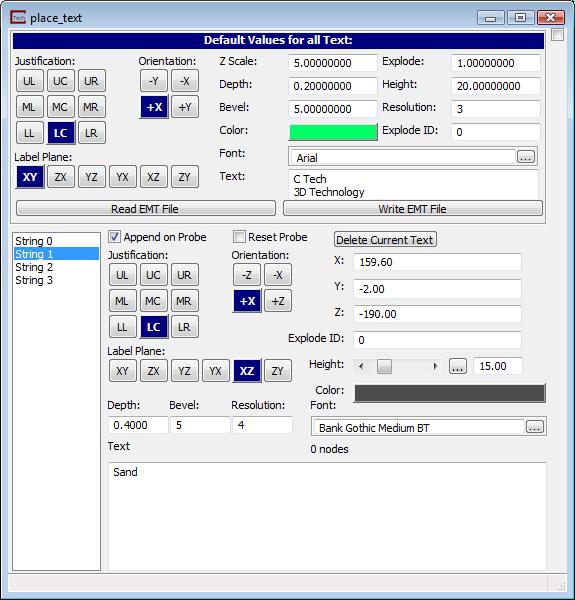
The control panel for place_text is shown above. The panel is in two sections. The first has the default values for all new text strings that you create by probing. The lower section has many of the same parameters, but allows you to edit the values for these parameters for each string whether the string was created by probing or input from an EMT file.
Justification is identical to the controls in post_samples labeling.
Orientation is identical to the controls in post_samples labeling.
Label Plane Used in conjunction with the orient and angle subobjects, specifies the transformation for the character string: the choices are XY (analogous to horizontal/ground surface; etc. These are identical to the controls in post_samples Labeling.
X_coord, y_coord and z_coord are type-ins that are populated by probing (Alt+Left_Mouse) on any object in your Viewer. You can also modify the 3D location of the strings using these.
The Color button brings up a color selector window that allows you to specify any color for the text.
Z Scale: sets the z exaggeration factor for the z coordinates to place the text
Explode:allows z coordinates to be exploded with the same logic used to explode geologic layers. This makes it much easier to have labels on layers which move as you explode.
Depth: causes the text to be extruded as a truly 3D object. If set to zero (0.00) the text is flat.
Bevel: causes the 3D text to have beveled edges. Acceptable values are font dependent. If the value is too large the faces of some of the letters will appear to have holes and connectivity problems.
Resolution: is the smoothness of curves used to form the letters. Higher resolution requires more creation time, more memory and slower rendering, however the letters look better.
Orient Used in conjunction with the plane and angle subobjects, specifies the transformation for the character string: choices are left to right; right to left; down; and arbitrary (which requires using the angle slider).
The Height slider specifies the height of the character; the default character height is set based on the extents of the input field. It is used as a scale factor for both the height and width of the character.
The angle and path are adjusted by changing the orientation and plane. Spacing is determined by the font you choose. Each font's specific spacing is taken into account (this is actually part of the font itself).
EMT FILE FORMAT:
Lines beginning with "#" are comments
Lines beginning with "FONT" are font specification lines (more later)
Lines beginning with "END" specify the end of the file (this is optional, but if you want to have anything after the last command or data line, precede it with an "END" statement.
All other lines are DATA lines specifying the x-y-z coordinates of a string and the text for that string.
Blank lines are ignored.
The FONT specification lines contain the following information:
Size: The font size is the height of a typical Capitol letter in true user units
Justification: The justification options are the same as in post_samples labeling.
Plane: The plane options are the same as in post_samples labeling.
Orientation: The orientation options are the same as in post_samples labeling.
Red, Green, Blue: These 3 numbers determine the font color.
Resolution: The resolution parameter is the same as in post_samples labeling.
Depth: The parameter is the same as in post_samples labeling.
Bevel%: The Bevel percentage is the same as in post_samples labeling.
Font Face: The Font Face options are the same as in post_samples labeling.
The DATA lines contain four columns of information:
X coordinate
Y coordinate
Z coordinate
Text: Everything on the line after the z coordinate (and trailing spaces) is the text to be placed at the above coordinate.
# FONT Size Just. Plane Orient R G B Resolution Depth Bevel% Font Face
FONT, 4, MC, XZ, +X, 0.8, 0.8, 0.8, 3, 0, 0, Arial
# X, Y, Z, Bore
11566.34, 12850.59, 8.5, B-30
11586.34, 13050.59, 12.5, B-31
11381.7, 12747.5, 2.5, B-33
11414.4, 12781.1, 3, B-34
11410.29, 12724.69, 4.5, B-4
11427, 12780.9, 7.5, B-42
11086.52, 12830.67, 5.5, B-49
11211.87, 12710.75, 3, B-50
11199.04, 12810.16, 5, B-51
11496.34, 12753.59, 2.5, B-53
11209.35, 12993.94, 3, B-57
11301.97, 13079.66, 5.5, B-58
11286.77, 13026.7, 3, B-59
# FONT Size Just. Plane Orient R G B Resolution Depth Bevel% Font Face
FONT, 6, MC, XZ, +X, 1, 0.5, 0.5, 3, 0.1, 0, Arial
11393.47, 12948.9, 4.5, B-60
11309.03, 12948.99, 5, B-56
11248.75, 12870.91, 4, B-48
11259.67, 12819.29, 3, B-46
11298, 12808.63, 4, B-52
11338, 12830.8, 5, B-38
11401.73, 12897.77, 5, B-45
11416.9, 12819.45, 3.5, B-44
# FONT, Size, Justification, Plane, Orientation, Red, Green, Blue, Resolution, Depth, Bevel%, Font Face
FONT, 8, MC, XZ, +X, 1, 0, 0, 3, .3, 0, Arial Bold
11340.49, 12892.61, 3.5, B-47
11251.3, 12929.27, 3, B-75
END
© 1994-2018 ctech.com