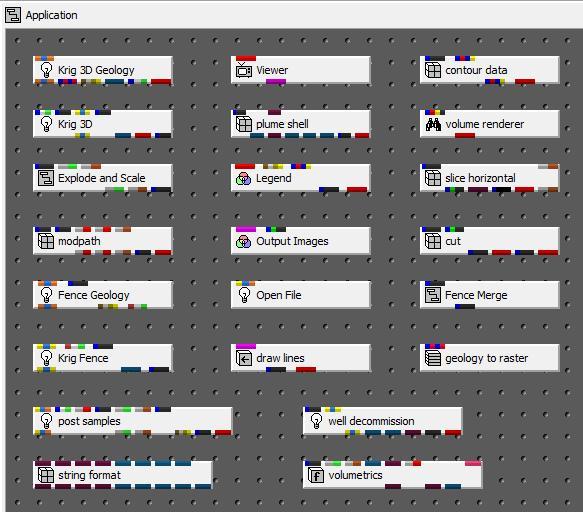
Red – Renderable object  This commonly used port connects to various modules, most notably the Viewer. It contains the grids, data and rendering information.
Blue-Black – EVS field  This is the most common port which passes your grids and data (nodal or cell) between modules that create these fields and those that subset or modify them.
Yellow-Blue-Yellow: Chemistry files  This data port is color coded to signify that it should contain chemistry file names only.
Yellow-Blue-Orange:Chemistry or Geology Files  This data port is color coded to signify that it should contain Chemistry or Geology file names only.
Orange-Blue-Orange: Geology Files  This data port is color coded to signify that it should contain Geology file names only.
Orange-Blue- Yellow: Pre-Geology Files  This data port is color coded to signify that it should contain Pre-Geology file names only.
Blue-White-Green: Geology Output  This common port is used to pass raw geology surfaces between various modules. Created only by Krig_3D_Geology.
Grey-Brown: Z-Scale  This port passes the z-exaggeration factor. Used by many modules such as Explode_and_Scale.
Grey-Green: Explode Factor  This port passes the explode factor. Used by many modules such as Explode_and_Scale.
Purple: View:  This port is a Viewer output port and input to many other modules. It is used to pass information to render images, allow for interactive drawing (Click_Sketch), and auto-size (add_logo).
Dark-Pink: int  This port passes integer values. The port may be vertically oriented as in the "int" module.
Dark Brown: double  This port passes floating point double precision values. The port may be vertically oriented as in the "double" module.
Greyish Blue: string  This port passes character string (text) information. The port may be vertically oriented as in the "string" module. Other modules using this include Titles and field_math.
Blue-Yellow-Red: Multi-surface  This is a special port to pass information to the geology_to_vistas module
Blue-Red-Blue-Red: Grid-info  This is a special port to pass information to the geology_to_vistas module
Blue-Green-Black: Image or 2D Field  This port passes image data (which is a 2D field) or simple flat surfaces (e.g. slice planes).
Blue-Red-Blue-Yellow: Contour levels  This is a special port to pass Contour level information between modules such as solid_3d_set, isolines, color_legend and Datamap_Editor.
Blue-Red-Yellow-Black: Uniform Field  This is a special port to pass uniform fields into modules such as "volume_renderer". You can connect to this port with port 2 (blue-black) if the output is a uniform field.
Brown-White-Green: Fence Geology  This port passes geologic information between Fence Geology and Krig_Fence.
Grey-Red Time/Date  This port passes time and/or date information
Brown-Grey-Light Brown-Beige  Geology Material Names This port passes Geology Material Name information from modules like Krig_3D_Geology or post_samples to modules such as Legend.